2026-09-14·nextjsreactarchitecturetemplates
Next.js Template vs Boilerplate vs Starter: Which Should You Choose?
Taher Hathi

Taher Hathi
Confused between a Next.js template, boilerplate, or starter? Learn the architectural differences, pros & cons, and how to choose the right foundation for your project.
Introduction: Why the Distinction Matters
When starting a new React or Next.js project, you will encounter three terms used almost interchangeably across GitHub, Reddit, and developer marketplaces: Template, Boilerplate, and Starter.
While they all aim to help you ship faster, they serve fundamentally different architectural purposes:
- Picking a starter when you need complete multipage UI leads to spending weeks designing pages.
- Picking a boilerplate with heavy backend opinionation when you only need a high-converting landing page leads to removing hundreds of lines of unwanted config.
- Picking a template gives you design-first, production-ready layouts that let you launch in days.
This guide clarifies the exact definitions, compares trade-offs, and provides a clear decision matrix for your next web application.
At a Glance Comparison
| Attribute | Next.js Template | Next.js Boilerplate | Next.js Starter Kit |
|---|---|---|---|
| Primary Focus | UI/UX Design, Multi-Page Layouts, Conversion | Backend Plumbing (Auth, DB, Billing, Queue) | Minimal Config (TypeScript, ESLint, Tailwind) |
| Completeness | Full pages (Landing, Pricing, Dashboard, Settings) | Functional plumbing + minimal UI | Bare skeleton |
| Customization Effort | Replace copy, logos, and connect API routes | Write all UI from scratch, configure backend | Build everything from ground up |
| Time to Launch | 1–3 Days | 1–2 Weeks | 3–6 Weeks |
| Best For | Commercial SaaS, Startups, Agencies, Client Projects | Complex backend apps requiring specific DB/Auth | Learning, custom design systems, hackathons |
| Example | Crystal-AI, Nextjsshop Templates | SaaS-Boilerplate (Prisma + Auth.js) | create-next-app |
1. What is a Next.js Starter?
A Starter is the minimal baseline configuration required to get Next.js running with specific developer tooling.
Common Components of a Starter:
- Next.js App Router configuration
- TypeScript setup with strict typing
- Styling baseline (e.g. Tailwind CSS, PostCSS)
- Linting and code formatting rules (ESLint, Prettier)
1# The classic Next.js starter
2npx create-next-app@latest my-app --typescript --tailwind --app
When to use a Starter:
- You have an in-house design team that provided custom Figma designs.
- You are learning the core mechanics of Next.js 16.
- You want zero third-party architectural baggage or unneeded dependencies.
2. What is a Next.js Boilerplate?
A Boilerplate focuses heavily on backend architecture and operational plumbing. Instead of focusing on UI aesthetics, it pre-wires the technical infrastructure every modern SaaS requires.
Common Components of a Boilerplate:
- Authentication: Supabase Auth, Clerk, or NextAuth / Auth.js.
- Database & ORM: PostgreSQL with Prisma, Drizzle, or Supabase.
- Payments & Subscriptions: Stripe webhooks, customer portal, or Razorpay.
- Email Delivery: Resend, Postmark, or SendGrid integration.
- Transactional Logic: Background jobs and rate limiting with Redis/Upstash.
When to use a Boilerplate:
- You have unique custom UI requirements but don't want to write Stripe webhook verification or JWT authentication logic from scratch.
3. What is a Next.js Template?
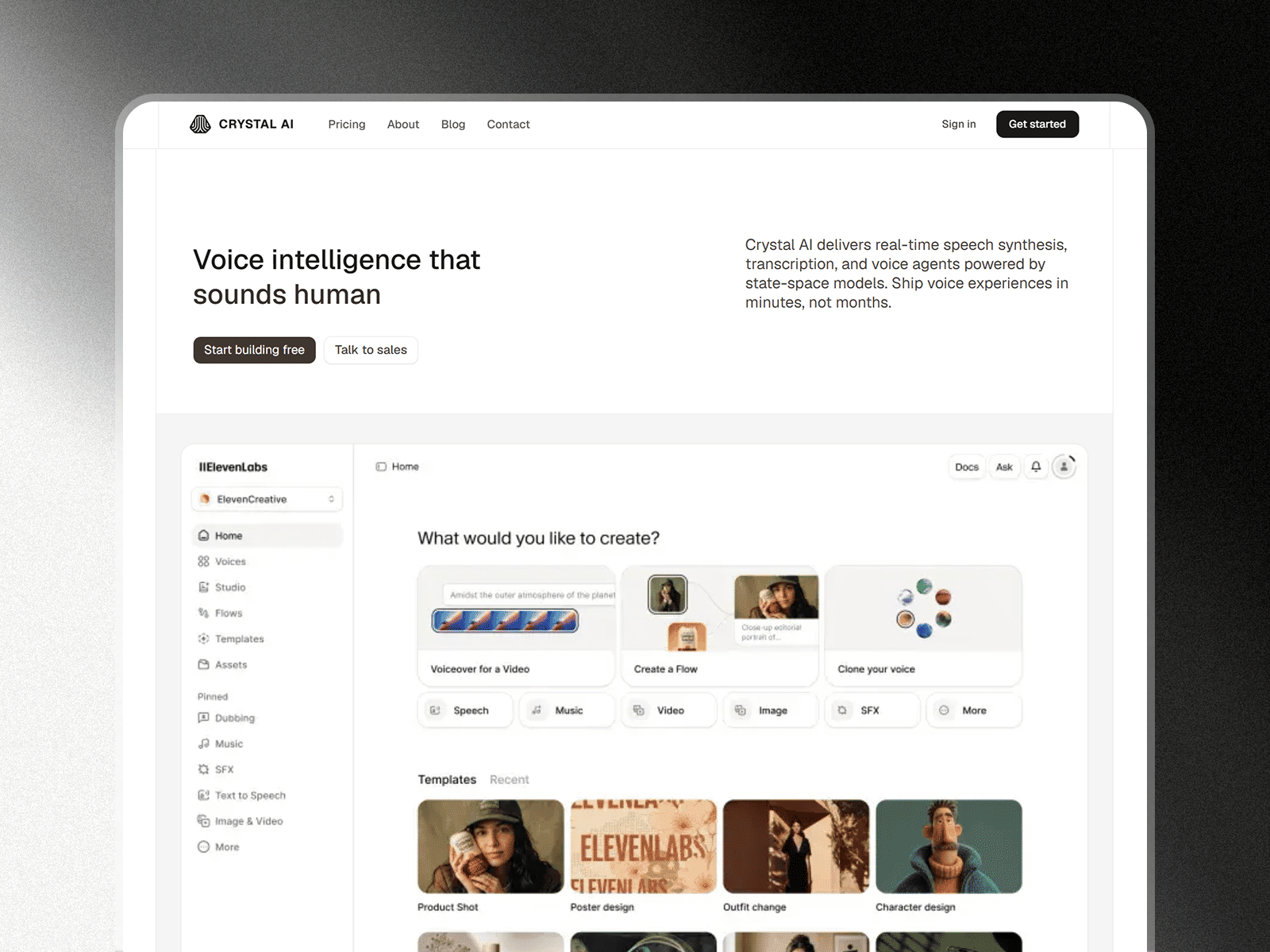
A Template is a design-led, multipage production codebase. It delivers complete, professionally styled user interfaces, responsive layouts, micro-interactions, and conversion-optimized flows out of the box.
Modern Next.js templates on Nextjsshop combine the best of both worlds: they provide stunning, accessible UI built with shadcn/ui and Tailwind CSS, paired with clean Next.js 16 server actions and route handlers.
Common Components of a Next.js Template:
- Conversion-Optimized Pages: Hero sections, pricing tiers with monthly/annual toggles, feature grids, testimonials, FAQ accordions.
- Functional App Views: Multi-tenant dashboards, analytics charts, settings screens, command palettes, and auth forms.
- Component Modularity: Reusable copy-paste UI blocks compatible with shadcn/ui.
- SEO & Structured Data: Pre-configured OpenGraph tags, JSON-LD schemas (SoftwareApplication, ItemList, Breadcrumbs), and dynamic sitemaps.
When to use a Template:
- You are launching an MVP or SaaS startup and want to look like a Series-A company on Day 1.
- You are a freelance developer or agency delivering client projects under tight deadlines.
- You want copy-pasteable shadcn/ui blocks that you can customize effortlessly.
How to Choose: The Decision Framework
Ask yourself the following three questions before starting your project:
Step 1: Where is your biggest bottleneck?
- Is your bottleneck design and frontend polish? ➡️ Choose a Next.js Template.
- Is your bottleneck complex backend workflows (queues, multi-db)? ➡️ Choose a Boilerplate.
- Is your bottleneck understanding how Next.js works? ➡️ Choose a Starter.
Step 2: What is your timeline to launch?
- Launch in 48–72 hours: A template gives you complete pages ready for your content.
- Launch in 30+ days: A starter allows you to build custom UI brick by brick.
Step 3: Does the codebase follow modern standards?
Regardless of your choice, verify that your foundation uses:
- Next.js 16 App Router (with Server Components and Actions)
- Tailwind CSS v4 or latest shadcn/ui components
- TypeScript with strict type checking
- Fast, accessible SVG icons (
lucide-react)
Summary
| Need | Recommended Path |
|---|---|
| High-converting SaaS marketing + dashboard UI | Browse Nextjsshop Templates |
| Voice AI or Audio Generator application | Crystal-AI Template |
| Standalone copy-paste UI blocks (Hero, Pricing, Bento) | Nextjsshop shadcn/ui Components |
| Minimalist blank canvas | create-next-app Starter |
Starting with the right template saves weeks of non-differentiated frontend work, letting you focus on what makes your product unique.